
/Flags/us.svg)
/Flags/mx.svg)
/Vector%20(6).svg) Back to Blog
Back to Blog
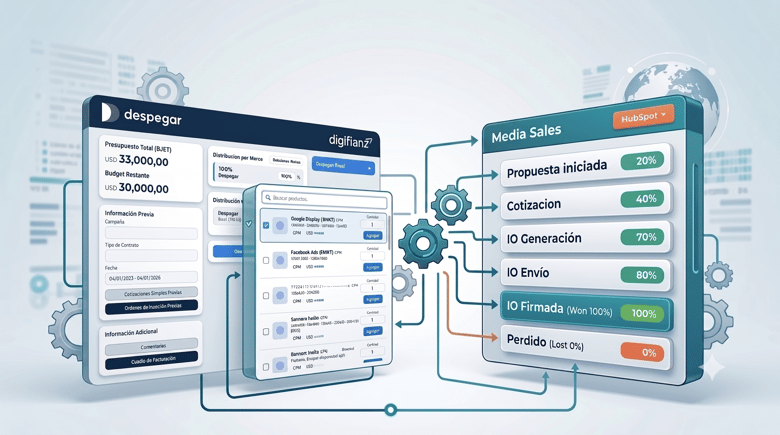
As Despegar’s Media Sales operations grew in complexity, the company implemented a custom quoting solution and a dedicated sales pipeline in HubSpot to centralize and streamline campaign proposals.
About Despegar:
Despegar is one of the leading online travel companies in Latin America, offering services such as flights, hotels, travel packages, and experiences across multiple markets.
Through its Media Sales division, the company also enables brands to advertise across its digital ecosystem, creating marketing campaigns that reach millions of travelers throughout the region. Managing these campaigns requires coordinating multiple brands, countries, advertising products, and billing structures within a single commercial process.
Project and Goal:
The goal of the project was to simplify and centralize the creation of complex media sales proposals directly within HubSpot. This approach is similar to other custom quote workflows in HubSpot, where sales teams need a more integrated way to manage proposals and approvals.
The Media Sales team frequently works with campaigns that involve multiple brands, geographic markets, and advertising formats. Building proposals required distributing budgets across different combinations of brands and countries while maintaining consistency with billing structures and financial processes.
To streamline this workflow, a custom Sales Quoting Tool was developed and embedded directly within the HubSpot deal view. The objective was to allow sales representatives to design, optimize, and generate proposals from a single dashboard integrated with the CRM.
At the same time, a dedicated Media Sales pipeline was implemented in HubSpot Sales Hub, enabling the team to manage the entire commercial lifecycle—from opportunity creation to signed insertion orders—while keeping all information centralized in HubSpot.
Main Challenges:
Before implementing the quoting tool, the process of building commercial proposals required navigating multiple tools and manual processes.
Information was dispersed across Excel spreadsheets, internal documents, emails, and CRM records, making it difficult to maintain consistency across teams.
Sales representatives had to manually calculate how to distribute campaign budgets across brands, countries, and advertising products. This increased the risk of errors and made proposal preparation particularly time-consuming when campaigns involved multiple markets and formats.
Additionally, maintaining alignment between the commercial planning of the campaign and the billing structure that ultimately reached the financial system often created friction between the sales and finance teams.
Another challenge was the way new opportunities were created. The Media Sales team relied on an external Google Form to register new deals, which fragmented the workflow and required additional steps before opportunities could be managed inside HubSpot.
As a result, each proposal often required rebuilding the entire planning structure from scratch, taking valuable time away from sales activities.
Solution:
To address these challenges, a custom Sales Quoting Tool was developed and embedded directly within the HubSpot deal interface.
Implemented as a global module within the HubSpot theme /000 - DFZ - General Theme v2, the tool provides an interactive quoting dashboard accessible from each deal.
From this interface, sales representatives can:
- View and control the total campaign budget
- Distribute budgets across brands and countries
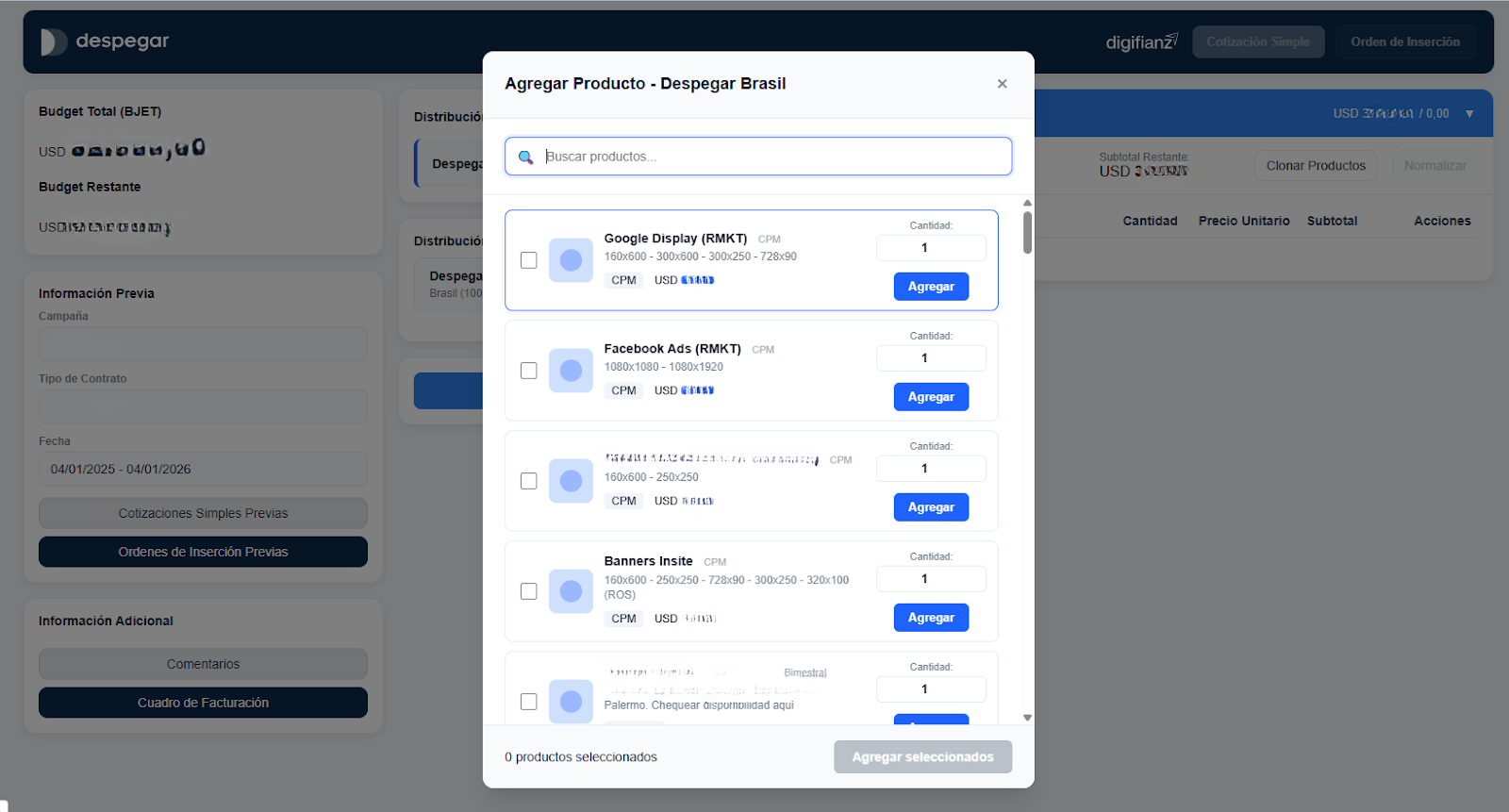
- Select advertising products from a centralized catalog
- Configure campaign details such as dates, quantities, and pricing
- Generate quotes or insertion orders directly from HubSpot
This solution allows the entire proposal process to be managed within the CRM, eliminating the need to rely on external spreadsheets and tools.
Implementation:
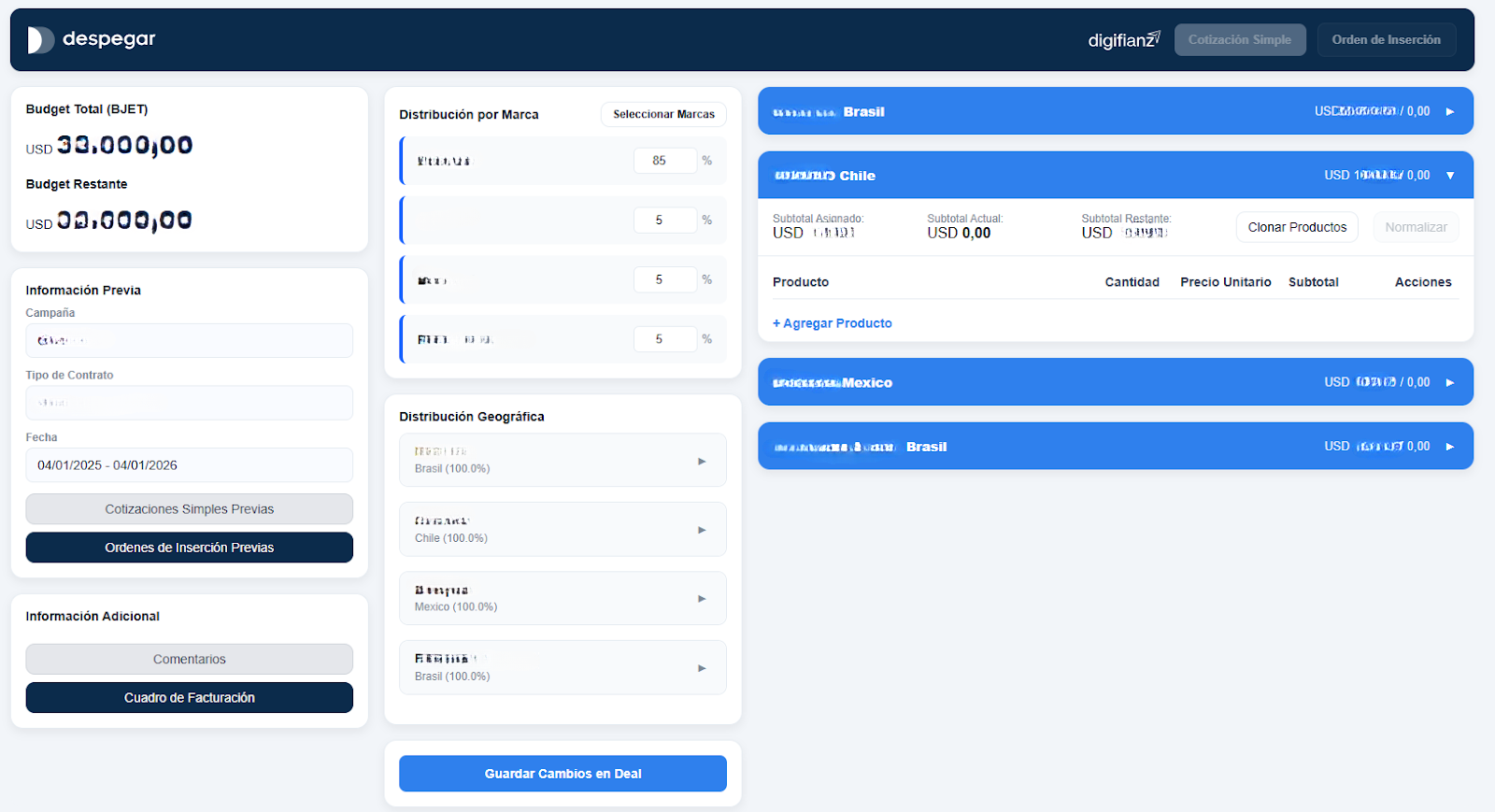
The quoting dashboard was designed as a modern and intuitive interface that allows sales executives to visualize the financial state of a proposal at a glance.
Budget Visualization and Remaining Balance
The system displays the total campaign budget (BJET) in USD and automatically calculates the remaining budget as users configure products. This allows sales representatives to immediately understand how much budget remains available and prevents proposals from exceeding the agreed limit.
Brand and Geographic Budget Distribution
Users can define the campaign structure by selecting:
- The brands participating in the campaign
- The countries where each brand will run
- The percentage of budget allocated to each market
The interface includes visual indicators that guide users until each brand–country combination reaches exactly 100% allocation, minimizing errors in geographic distribution.
Product Configuration by Market
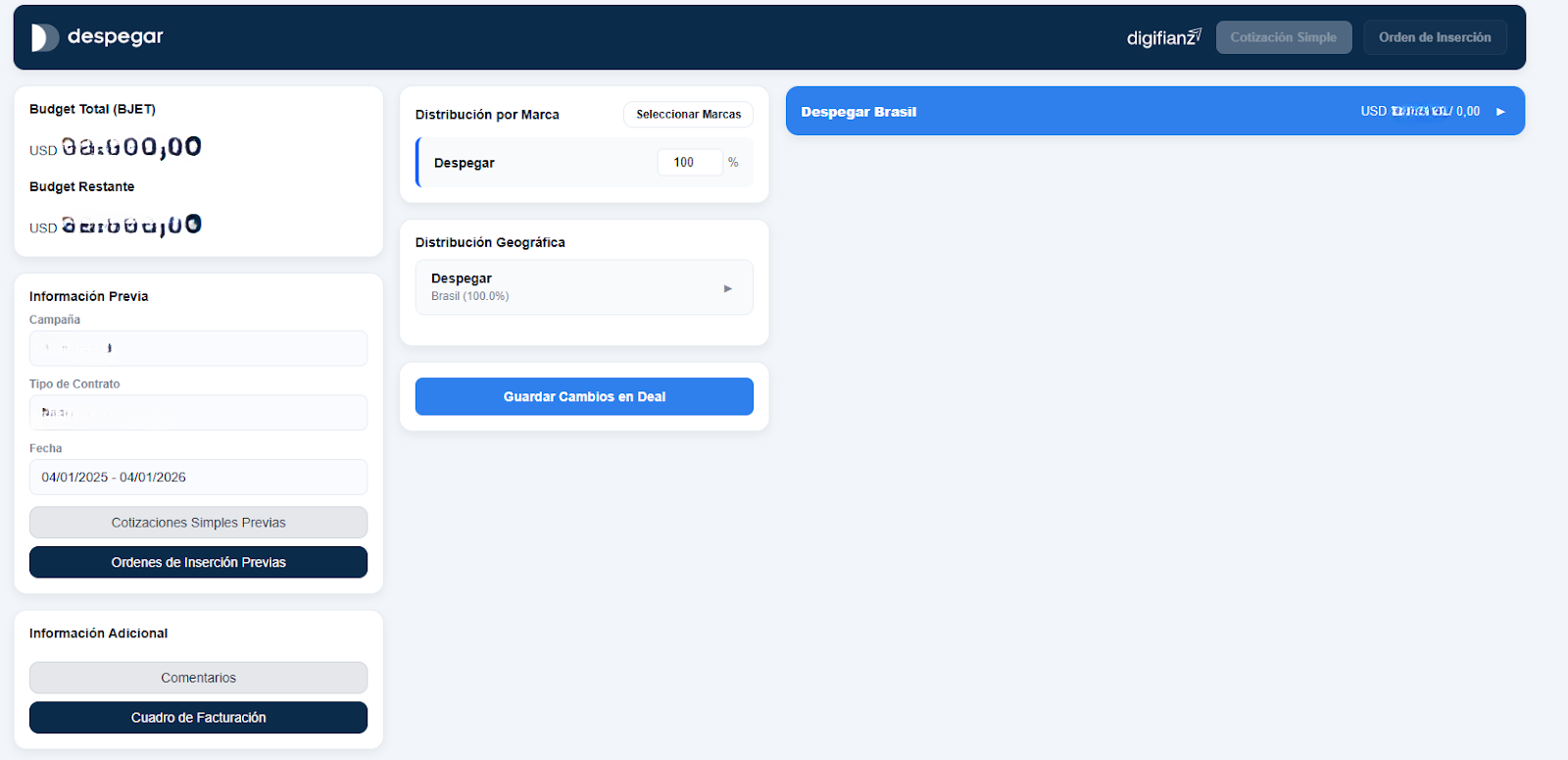
For each brand–country combination, the system generates a configuration panel where users can:
- Add advertising products from the catalog (such as banners, social ads, or landing pages)
- Configure start and end dates
- Define quantities and unit prices
- View subtotals for each product line
Each panel aligns with the billing rules and the characteristics of each market, ensuring consistency between campaign planning and financial operations.
Intelligent Budget Normalization
One of the most powerful features of the tool is the “Normalize” function.
Sales representatives can define a target subtotal for each section, and the system automatically adjusts prices—and when necessary quantities—for non-bonus products.
The algorithm:
- Respects minimum and maximum pricing limits
- Iteratively distributes adjustments across products
- Prioritizes items with greater flexibility
This ensures that the section subtotal matches the assigned budget while eliminating manual recalculations.
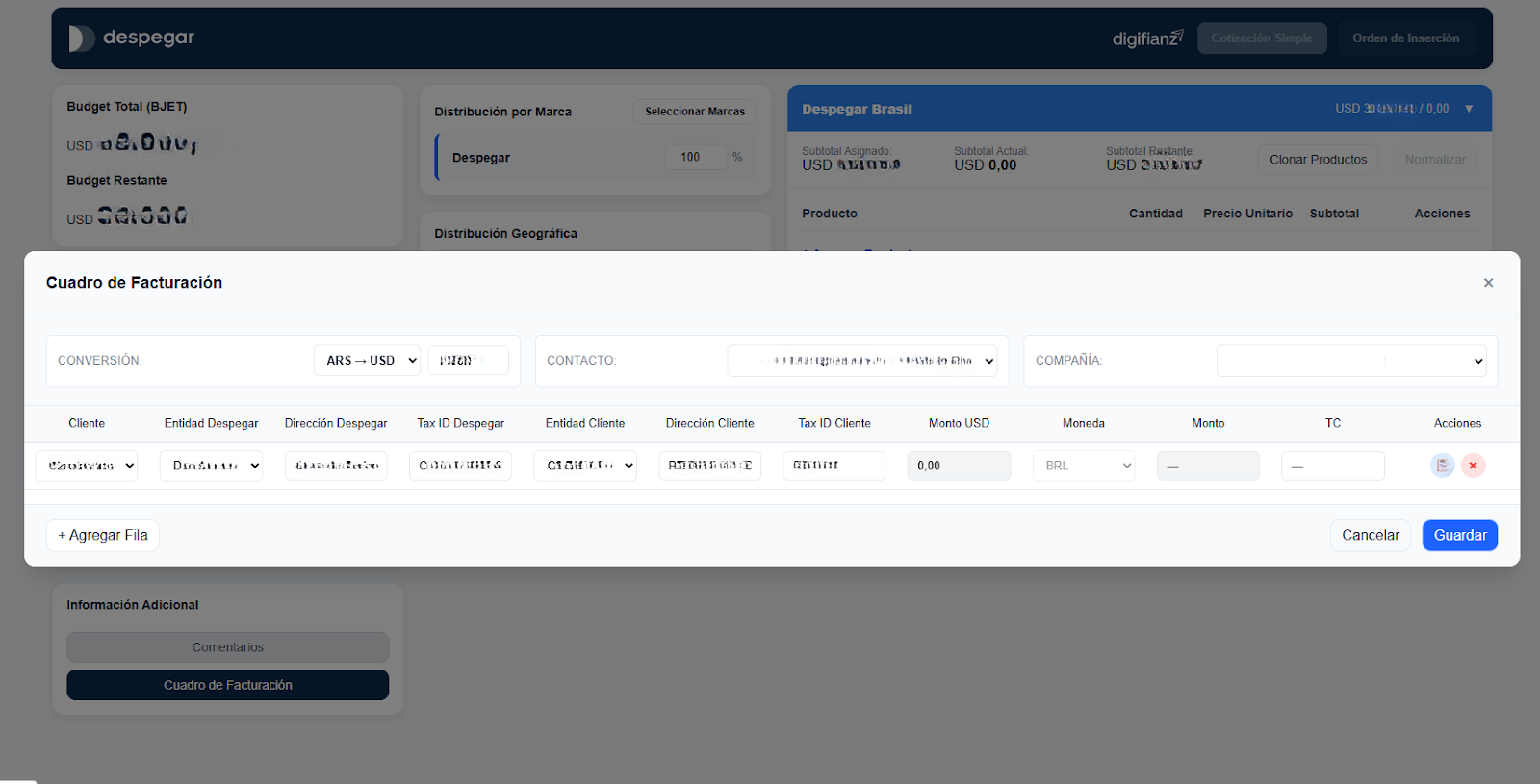
Comments and Context Management
The quoting dashboard also centralizes campaign context by allowing users to:
- View key deal information such as campaign name, contract type, and important dates
- Manage internal comments from the commercial team
- Access and edit the billing structure associated with the deal
This transforms the dashboard into a single reference point for understanding the full commercial context of the campaign.
Quote and Insertion Order Generation
From the top navigation bar, users can generate:
- Simple Quotes for preliminary proposals
- Detailed Insertion Orders aligned with the billing structure
The system consolidates all deal data—including product line items, brand and geographic distribution, comments, and billing details—and updates quotes and documents directly within HubSpot.
Deal Synchronization
Through the “Save Changes to Deal” function, all information configured in the quoting dashboard is synchronized with the HubSpot deal.
This includes budgets, distribution structures, product line items, and relevant comments, ensuring HubSpot remains the single source of truth for the commercial process.
Sales Pipeline Implementation:
To complement the quoting tool, a dedicated Media Sales pipeline was implemented within HubSpot Sales Hub.
The pipeline includes the following stages:
-
Proposal Initiated: The sales executive creates the deal and registers the initial campaign information.
-
Quotation: The sales team uses the integrated quoting tool to build the commercial proposal.
-
Insertion Order Generation: Once validated internally, the insertion order is generated.
-
Insertion Order Sent: The insertion order is sent to the client for review.
-
Insertion Order Signed: The client signs the document and the deal is marked as won.
-
Lost Opportunity: The opportunity is closed as lost if the client does not proceed.
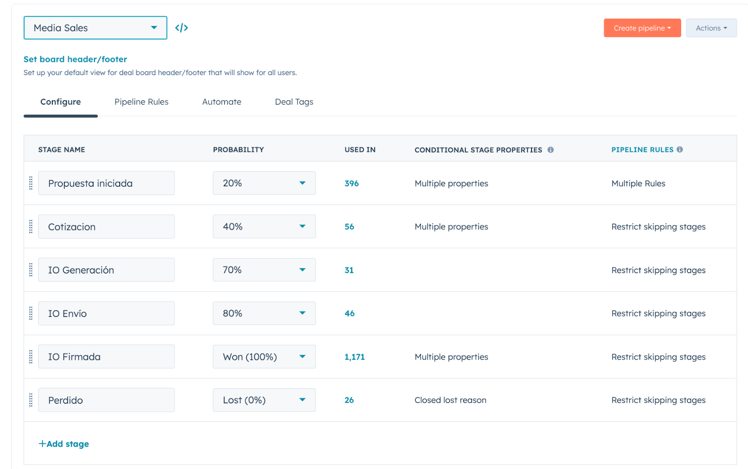
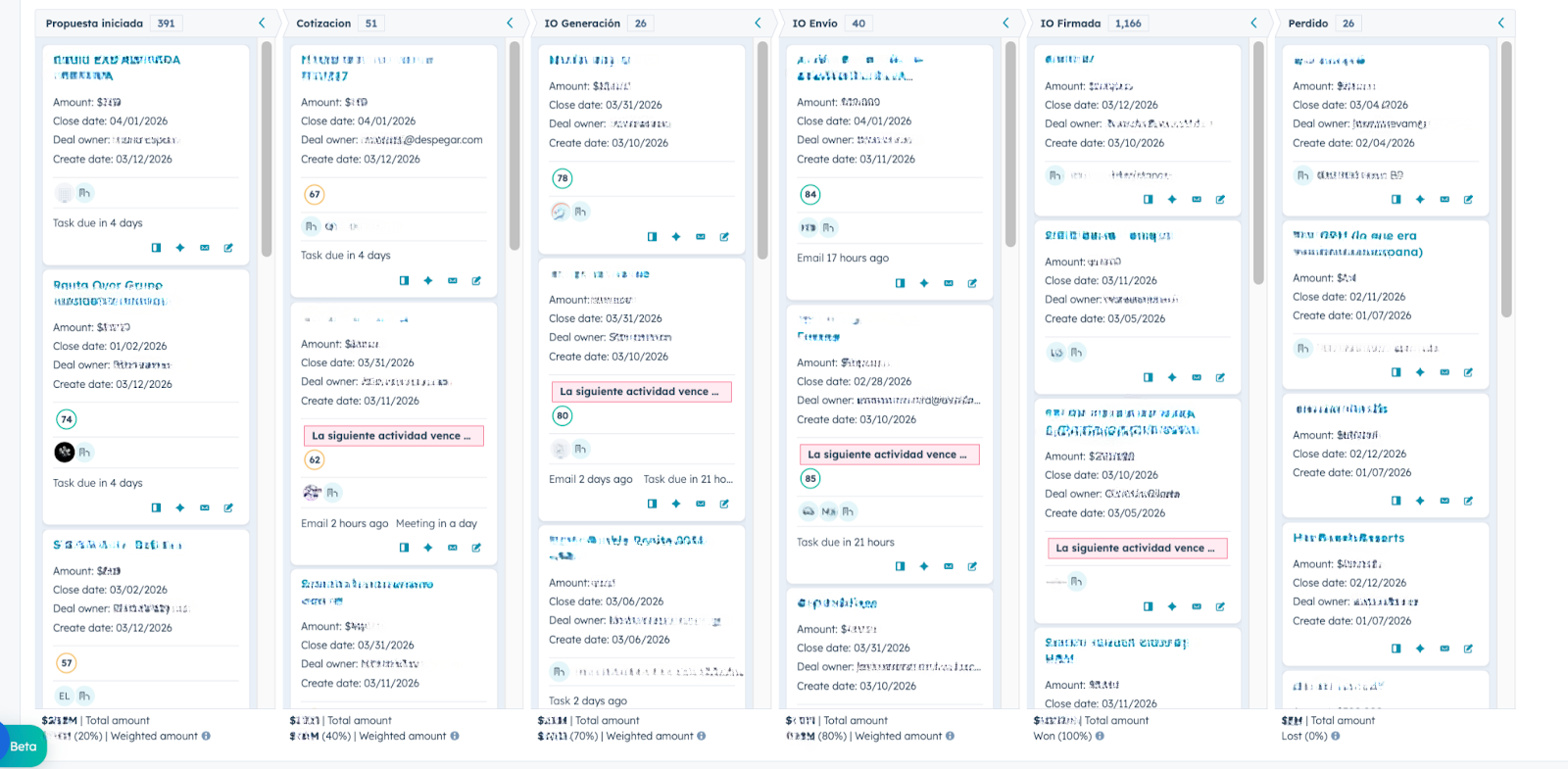
Each stage includes required properties and validation rules to ensure that key information is captured before advancing.
Automations were also implemented to support the team, including task creation, stage validation, and follow-up reminders.
Additionally, custom reporting dashboards were configured to provide visibility into pipeline value, active proposals, conversion rates between stages, and individual sales performance.
Conclusion:
With the implementation of the custom Sales Quoting Tool and the Media Sales pipeline in HubSpot, Despegar successfully centralized its proposal workflow within the CRM.
Sales opportunities are now created directly in HubSpot, proposals are built through the integrated quoting dashboard, and insertion orders are generated from the same platform.
As a result, the Media Sales team now operates with a more structured and scalable commercial process, reducing manual work while improving alignment between sales and finance teams.
For a broader view of how HubSpot has supported the same brand in another area, you can also explore another HubSpot implementation for Despegar.
Looking for a strategic partner to build custom solutions and optimize your sales processes in HubSpot? , we would love to talk!
.svg)
/Vector%20(28).svg)

/Vector%20(27).svg)
/Vector%20(26).svg)


